
Question · Privacy and permissions
What does Cuddle send, and how do I turn it off?
Short answer
Cuddle sends anonymous usage and crash reports, like which tool ran and whether it worked. To turn them off, open Cuddle’s Settings panel in Premiere Pro and click Turn Off.
Turn reports off
Open Cuddle’s Settings. Click the gear in the Cuddle panel, or open it from the Window menu.
- Window
- UXP Plugins
- Cuddle
- Cuddle Settings
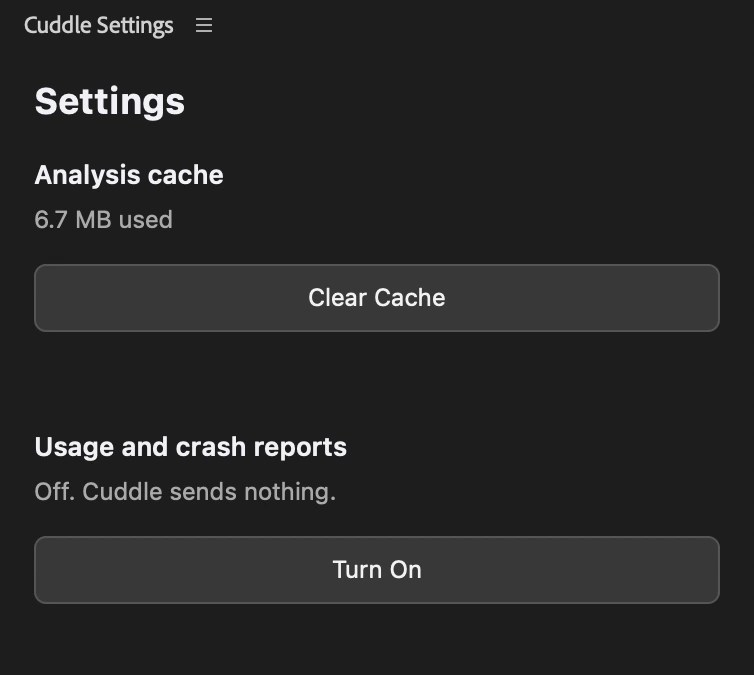
Click Turn Off. Under Usage and crash reports, click Turn Off. The panel then says Off. Cuddle sends nothing.
What reports include
- Which Cuddle tool ran, whether it worked, and how long it took
- Crash details from inside Cuddle
- Your versions of Cuddle, Premiere Pro, and macOS
- The name of the AI app connected to Cuddle
- A random ID that isn’t tied to you
Reports never include your media, transcripts, file paths, or the names of your projects, files, or sequences. When you turn reports off, Cuddle also deletes any that were waiting to be sent. Reports go to PostHog, an analytics service, and aren’t sold or used for advertising. The Privacy Policy has the full details.
Have another question? Ask Bear.